WooCommerce abandoned cart recovery: causes, fixes & best practices
Table of Contents
- What is cart abandonment recovery?
- Why customers abandon carts
- The main causes of cart abandonment, and how to fix each one
- Unexpected costs at checkout
- Being forced to create an account
- Security and trust concerns
- A long or complicated checkout
- No visible discount or a broken coupon
- Unclear return or shipping policies
- Measure the leak before you fix it
- Reduce abandonment at the source with CheckoutWC
- Optimize your checkout template
- 1. Fully optimized for mobile
- 2. Minimize form fields
- 3. Offer autofill and address validation
- Implement one-page checkout
- Add express checkout
- Implement a side cart
- Add guest checkout
- Add trust badges
- Recover the carts you still lose
- Recovery email best practices
- A recovery sequence that works
- Go beyond email: retargeting and SMS
- Measure, recover, then measure again
- Frequently asked questions
- What is a good cart abandonment rate?
- Does GA4 track abandoned carts automatically?
- What is the difference between an abandoned cart and an abandoned checkout?
- When is a cart counted as abandoned?
- Is it legal to send abandoned cart recovery emails?
- How many recovery emails should I send?
- What share of abandoned carts can I expect to recover?
- Turn it on
Most of the people who add something to their cart on a WooCommerce store never buy it. The Baymard Institute puts the average cart abandonment rate at around 70%, which means for every ten shoppers who reach your cart, roughly seven leave without paying. WooCommerce cart abandonment on that scale isn’t a rounding error. It’s the single largest pool of almost-revenue your store has, and most of it is recoverable.
This is the complete guide to doing something about it on WooCommerce. We’ll cover why people abandon, how to fix the causes at the source, how to measure the leak so you know what’s actually happening, and how to win back the carts you still lose with recovery emails and retargeting. We build CheckoutWC, so where our checkout plays a part we’ll show you exactly how, but the principles apply to any WooCommerce store.

The simplicity of Shopify with the power of WooCommerce. Replace your WooCommerce checkout page with CheckoutWC to boost sales and reduce cart abandonment.
What is cart abandonment recovery?
Cart abandonment recovery is the set of tactics that bring a shopper back to finish a purchase they started and left. The most common method is a sequence of timed reminder emails, triggered when someone enters their email at checkout but doesn’t complete the order. Retargeting ads (Meta, Google) cover the shoppers you couldn’t capture an email for. Done well, recovery turns a chunk of that 70% back into orders, and it’s some of the cheapest revenue you’ll ever earn, because it acts on demand you already paid to create.
Why customers abandon carts
Abandonment is rarely one thing, and most of it isn’t even about your store. Baymard’s research finds that over half of shoppers (around 58%) abandon simply because they’re still browsing and not ready to buy. Those people were never going to convert on the first visit, and that’s fine. Your job is to be there, helpfully, when they come back.
The rest is friction and surprise, and that part you control. Abandonment also varies wildly by category: high-consideration purchases like travel and electronics routinely top 80%, while everyday goods like groceries sit closer to 60-70%. The takeaway is to treat abandonment as a signal to remove friction and re-engage, not as a verdict on your product.
The main causes of cart abandonment, and how to fix each one
When a ready-to-buy shopper still leaves, it’s almost always one of these. Each has a concrete fix.
Unexpected costs at checkout
Surprise shipping, taxes, or handling fees added at the last step are the most cited reason people bail. Show the full cost as early as you can. Put shipping estimates on the product or cart page, lead with a flat rate or a free-shipping threshold, and never let the total jump at the final step.
Being forced to create an account
Mandatory registration is pure friction for someone who just wants to buy. Offer guest checkout, let people create an account after purchase if they want one, and consider social login or magic links for returning customers.
Security and trust concerns
Shoppers hesitate when they’re not sure it’s safe to enter card details. Make trust visible: SSL, recognizable payment logos, trust badges near the buy button, real reviews close to the call to action, and a clear contact and returns policy.
A long or complicated checkout
Around one in five shoppers abandon because checkout is too long or confusing. Cut steps, remove fields you don’t truly need, combine related fields, and offer express payment so many shoppers never type an address at all.
No visible discount or a broken coupon
A prominent but empty coupon field sends people off to hunt for a code, and a code that doesn’t work is worse. Display active discounts clearly, validate and test your promo codes, and apply qualifying discounts automatically where you can.
Unclear return or shipping policies
Vague policies raise the perceived risk of buying. State returns plainly, highlight the good parts (free returns, a generous window), and be clear about delivery times and costs up front. Offer at least one fast shipping option for time-sensitive buyers.
Measure the leak before you fix it
Here’s the step most stores skip. Before you change anything, find out where shoppers actually drop off, because guessing leads to fixing the wrong thing. The catch is that GA4 has no built-in “abandoned cart” event. You’ve got to derive abandonment from the gap between people who start checkout and people who finish, which means your store has to be firing the full funnel in the first place.
Once it is, abandonment stops being a single scary number and becomes a map: people leaving after the shipping step point to a shipping-cost problem, drop-off at payment points to trust or a gateway issue, and items being removed point to pricing. We wrote a full walkthrough of how to set this up and verify it. See how to measure and recover WooCommerce cart abandonment for the measurement half. Measure first, then use the fixes below where the data says they’ll pay off.
Reduce abandonment at the source with CheckoutWC
The cheapest cart to recover is the one that never gets abandoned. A faster, clearer checkout prevents the loss instead of chasing it later, and that’s exactly what CheckoutWC is built to do. Here’s how each part of it removes a reason to leave.
Optimize your checkout template
The easier it is for customers to complete their purchase, the more likely they are to follow through.
CheckoutWC offers optimized, customizable templates designed to enhance the user experience and keep those abandonment rates low. But what does an effective checkout template look like? Here are some examples:
1. Fully optimized for mobile
Instead of simply shrinking your desktop checkout to fit smaller screens, CheckoutWC completely reimagines the mobile checkout experience.
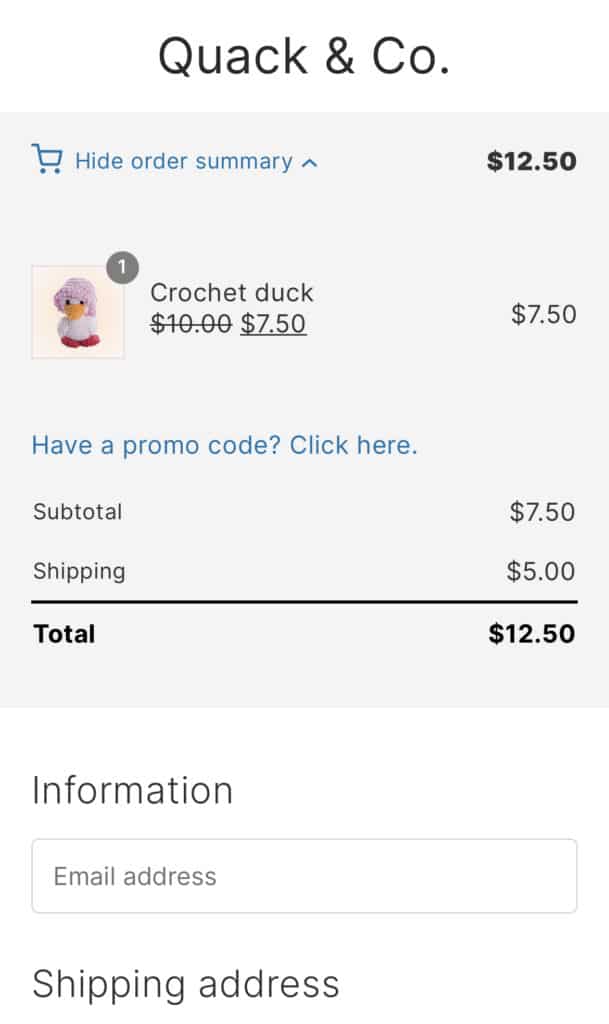
It offers smart features like mobile cart summaries, keeping your customers’ cart contents visible and accessible throughout the process. Additionally, order totals are strategically placed for easy viewing, so customers don’t have to hunt for their final price.
2. Minimize form fields
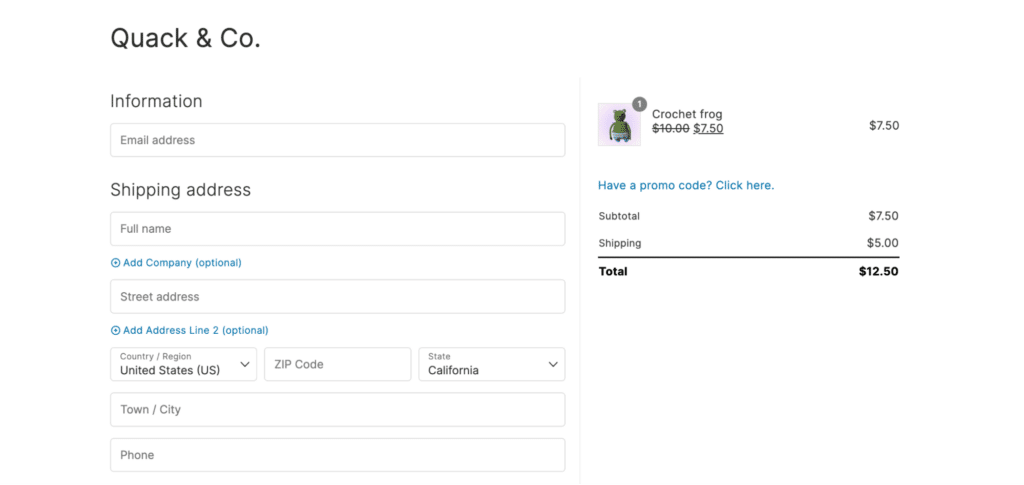
Reduce the number of fields customers have to fill out. For example, CheckoutWC lets you combine fields like first name and last name into a single field to make the checkout process more efficient.
3. Offer autofill and address validation
CheckoutWC’s address completion feature remembers returning customers’ details and fills them in automatically. And through address validation, you can automatically ensure everything’s correct. This means fewer typos, faster checkouts, and happier customers.
To enable address autocomplete, navigate to WP Admin > CheckoutWC > Pages. Under the Address Completion and Validation section, you can choose between Google Address Autocomplete or Fetchify Address Autocomplete. Here, you’ll also have the option to Enable Smarty Address Validation.
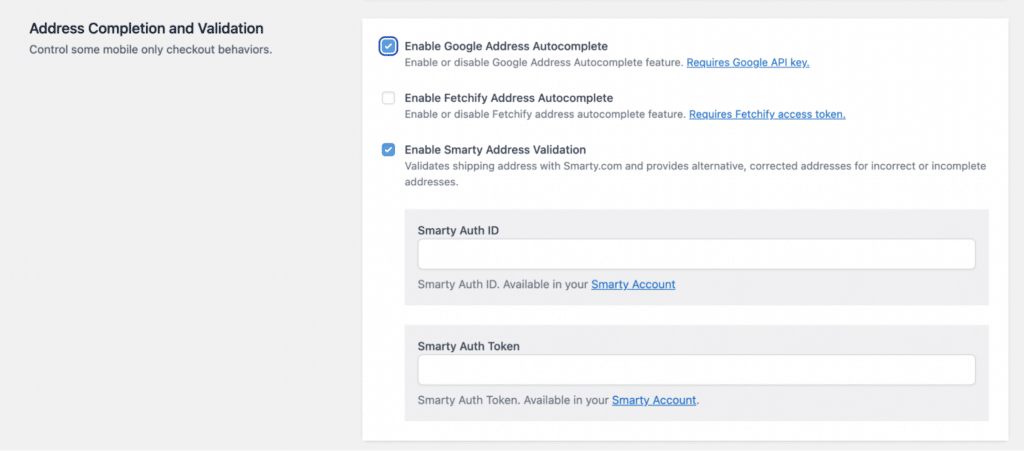
Remember, though, these features require integration with their respective services. You’ll need to set up API keys or access tokens, depending on the solution you choose:
- For Google Address Autocomplete, you’ll need to obtain a Google API key.
- If you opt for Fetchify Address Autocomplete, you’ll need to sign up for a Fetchify account and get an access token.
- To use Smarty Address Validation, you’ll need to create a Smarty account and obtain an API key.
Implement one-page checkout
One-page checkout puts everything your customers need on a single page. Here’s why it’s great:
- It’s quick: Fewer clicks mean faster purchases. In fact, 22% of users are likely to abandon their cart if they encounter a complicated checkout.
- It’s simple: Customers can see everything at once.
- It’s effective: Less chance of shoppers getting distracted and abandoning their carts.
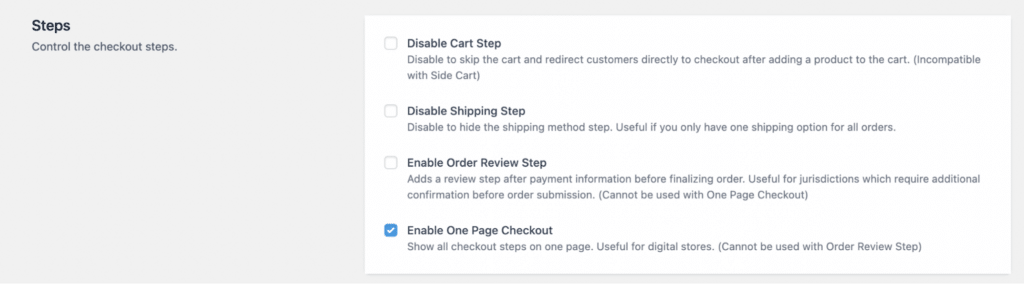
To enable one-page checkout using CheckoutWC, navigate to WP Admin > CheckoutWC > Pages and toggle Enable One Page Checkout.
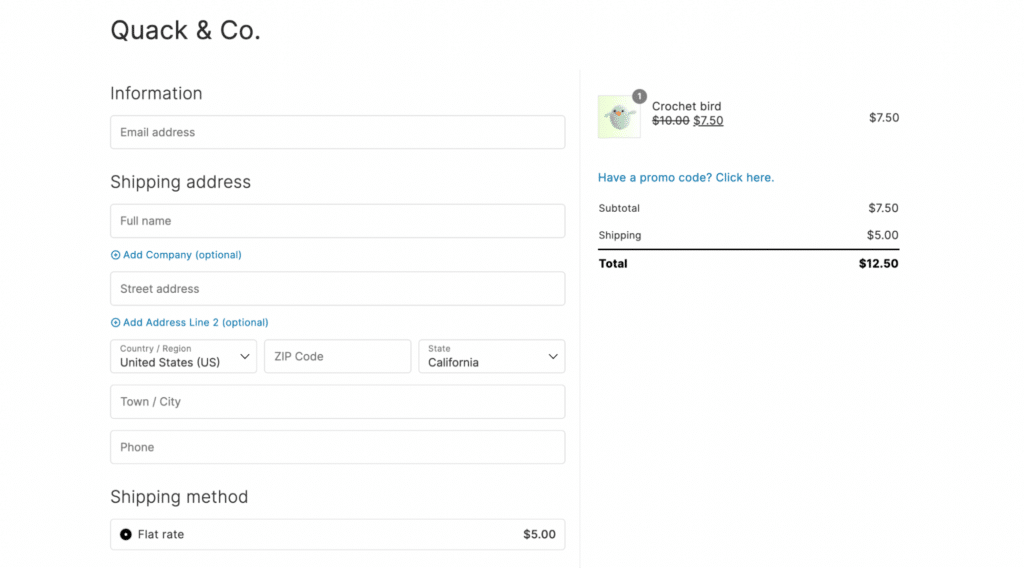
Once enabled, all the fields your customer needs will be displayed on a single, convenient page.
Add express checkout
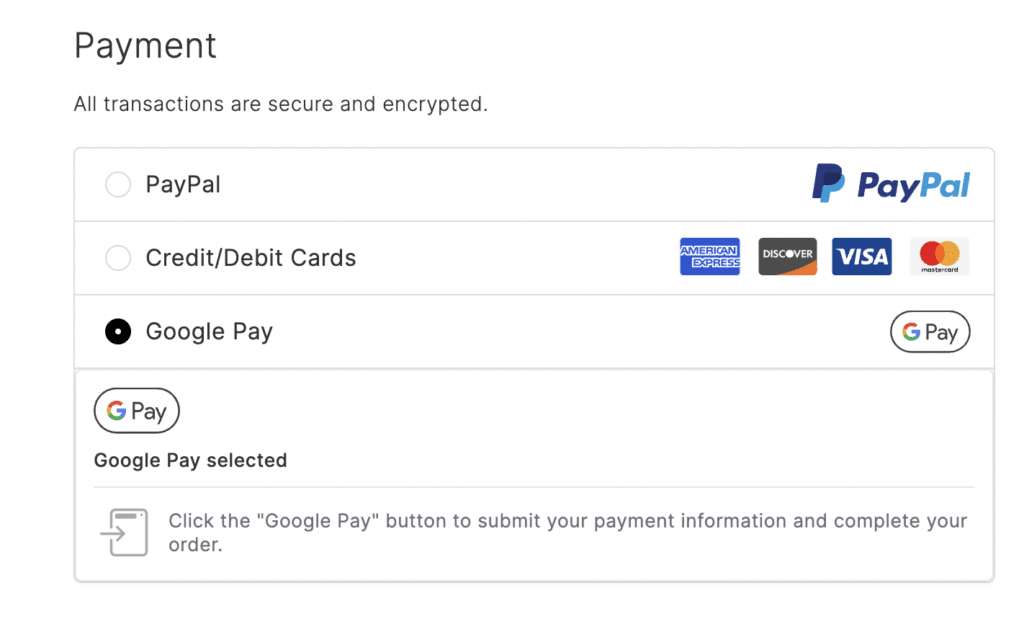
Let’s say a customer sees something they want on your site. With express checkout, they can buy it in just a few seconds. They don’t need to type in their card details or address, it’s all safely stored in the payment method they choose.
CheckoutWC supports Apple Pay, Google Pay, PayPal, and Amazon Pay, so your customers can quickly pay using their favorite option.
Implement a side cart
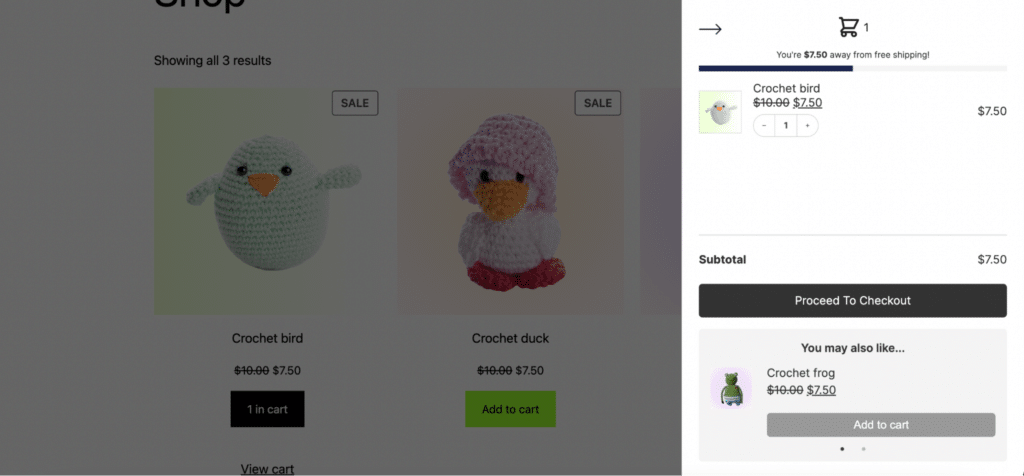
A side cart keeps a handy summary of your customer’s cart visible as they shop. When shoppers can easily see and manage their cart, they’re less likely to forget about it or get frustrated. It also lets them quickly check their total, add or remove items, and head to checkout when they’re ready.
CheckoutWC comes with a built-in side cart feature that’s fully customizable. You can edit your Side Cart icon to match your branding, enable a free shipping progress bar, display cross-sells, and more.
Add guest checkout
Guest checkout is all about giving customers the choice to create an account if they want or check out quickly without signing up.
Many shoppers prefer guest checkout, especially when they’re in a hurry or shopping on a site for the first time. With CheckoutWC, customers can choose to check out as a guest right from the start. They only need to enter the essential information to complete their purchase. No account creation required.
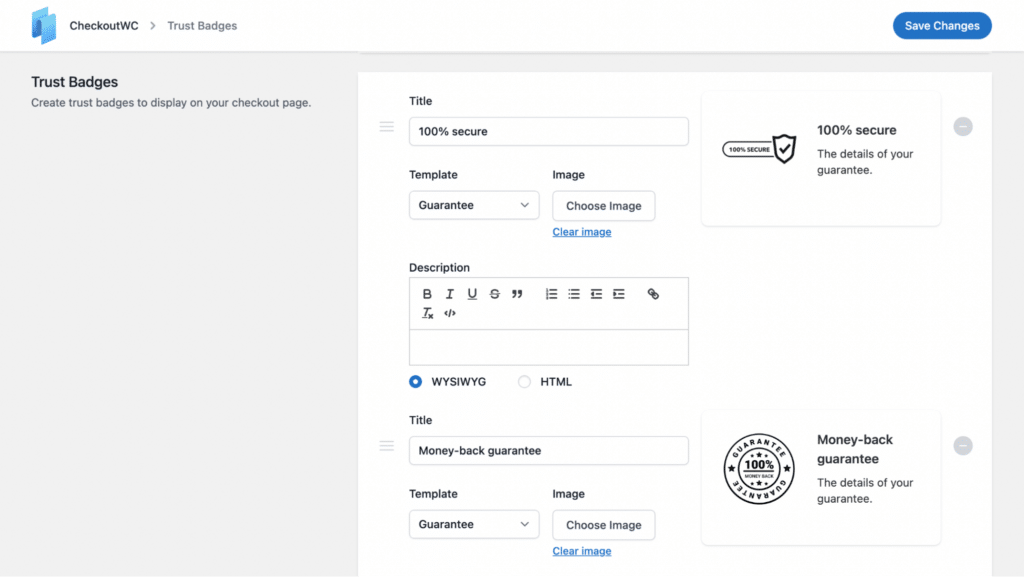
Add trust badges
Here’s why it’s a good idea to add trust badges:
- Show customers your site is secure: Security badges tell shoppers that their personal and payment information is protected.
- Build credibility: Badges from well-known security companies or positive customer reviews help prove that your store is trustworthy.
- Reassure hesitant shoppers: Sometimes, a small trust symbol is all it takes to turn a nervous browser into a confident buyer.
With CheckoutWC, you can choose where trust badges appear on your checkout page, customize how the badges look to match your store’s style, and change the wording to fit your brand’s tone and voice.
Recover the carts you still lose
You’ll never prevent every abandonment, so the other half of the job is reaching back out. Recovery means contacting someone who left and returning them to a checkout that still has their items in it. CheckoutWC includes Abandoned Cart Recovery as a built-in feature, so there’s no separate tool to bolt on. More than 1,000 WooCommerce stores already run it to win back lost sales.
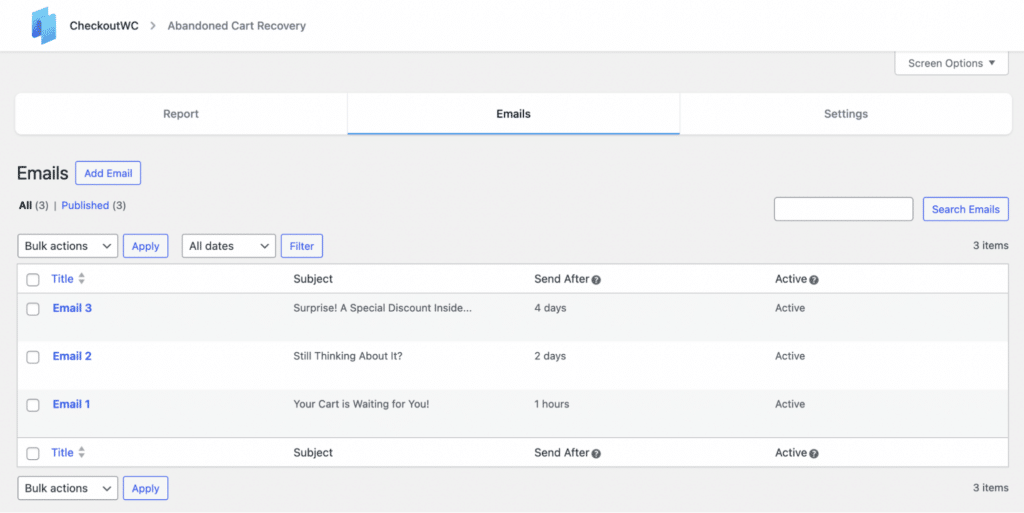
Here’s how it works under the hood:
- The moment a shopper enters their email at checkout, their cart is tracked, even if they never place the order. No email, no tracking, so capturing the email early matters.
- After a quiet period (15 minutes by default, and adjustable), the cart is marked abandoned and your first recovery email is scheduled.
- You write the sequence. Pro plans send an unlimited number of emails, each on its own delay.
- When the shopper clicks the link, CheckoutWC rebuilds their cart item by item and drops them straight onto checkout. They pick up where they left off instead of starting over.
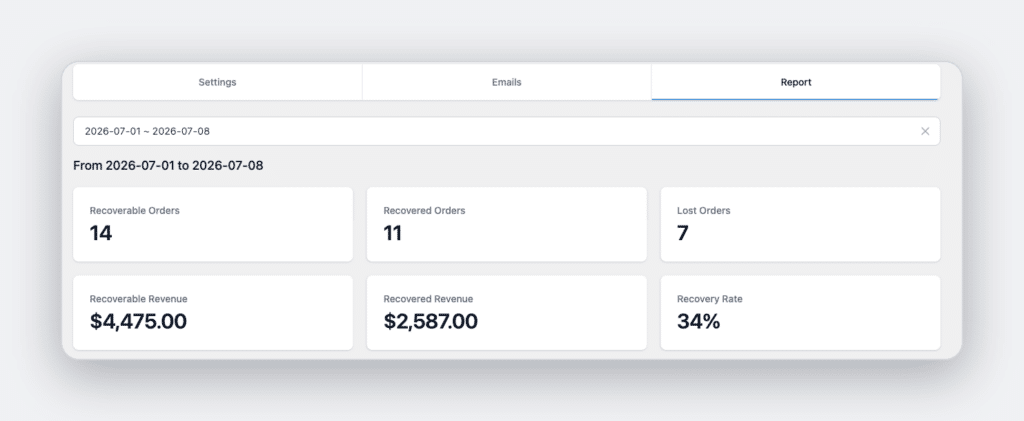
- The recovery dashboard reports your recovery rate and the actual revenue you’ve brought back.
Recovery emails only help if they actually reach the inbox, so deliverability matters as much as the copy. CheckoutWC sends through your transactional email setup and integrates with SendWP for reliable, managed delivery. SendWP is optional, though, so you can use any transactional email service you prefer.
Recovery email best practices
“The key to successful abandoned cart emails is to remind, incentivize, and make it easy for the customer to complete their purchase.”
Beka Rice, Product Architect at Kestrel
A few things separate a sequence that converts from one that gets ignored or marked as spam.
- Send the first email fast. Interest cools quickly, often within the first hour. Aim to send the first reminder within 30 to 60 minutes of abandonment.
- Get the subject line right. It’s the whole game for opens. Mix gentle reminders, light humor, FOMO, and the occasional incentive. Examples that work:
- “Oops, you left something in your cart!”
- “Carly, your new favorite jeans are waiting in your cart”
- “Only three pairs left of the jeans in your cart”
- “The price dropped on the item in your cart”
- “Still thinking it over? Your cart is waiting”
- “Last chance: your cart expires soon”
- Segment your messaging. A first-time abandoner and a repeat customer need different nudges. Be careful not to train shoppers that abandoning always earns a discount, or you’ll manufacture abandonment.
- Show trust in the email. Pull in product ratings or reviews (“you left highly-rated items in your cart”) to reinforce the decision.
- Make it one click to checkout. The link should land on a pre-filled checkout, never the homepage. The less friction between “I got the email” and “I’m buying,” the more carts come back.
- Test and iterate. Subject lines, timing, and incentives all move the numbers. Change one variable at a time and let your own recovery data, not a blog’s benchmark, settle which version wins.
A recovery sequence that works
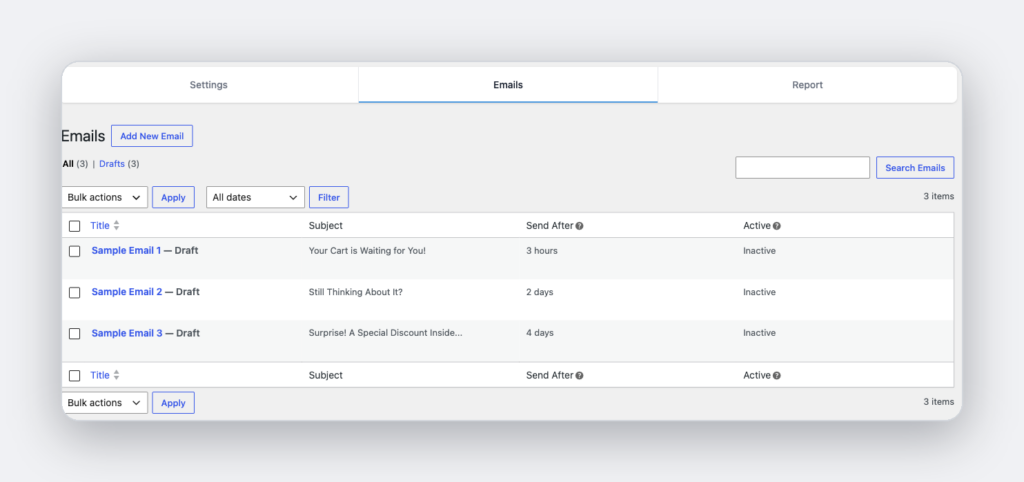
Three emails recover most of what’s recoverable. Add the optional fourth and fifth for discount-friendly audiences.
| Timing | Job | Example subject | |
|---|---|---|---|
| 1 | ~1 hour | Gentle reminder, reinforce the product | “Oops, you left something in your cart!” |
| 2 | ~24 hours | Add urgency and social proof | “Still thinking it over? Your cart is waiting” |
| 3 | ~48-72 hours | Final nudge with a clear CTA | “Last chance: don’t miss out on your cart” |
| 4 (optional) | Day 5 | First incentive, for discount-led audiences | “A special offer: save 10% on your cart” |
| 5 (optional) | Day 7 | Short, confident last call | “Final reminder: your cart expires soon” |
One gotcha worth knowing: in CheckoutWC each email’s Send After is an absolute delay from a fixed starting point, not a gap after the previous email. The first reminder is timed from when the cart is abandoned; later ones from when the cart was first started. Space them out enough that they don’t bunch up, and you’ll avoid the most common ACR surprise.
Go beyond email: retargeting and SMS
Plenty of abandoners never give you an email. For them, retargeting ads on Meta and Google can bring back a meaningful share of lost sales (some setups report recovering up to a quarter of them). It works by dropping a pixel that builds an audience of people who viewed products or started checkout, then showing them the items they left behind.
The honest catch is that wiring up pixels and conversion events across multiple ad platforms is fiddly, and standard WooCommerce doesn’t fire the events these platforms want. This is where measurement and recovery meet: the same setup that lets you see abandonment in GA4 also feeds your ad platforms. We use ConversionBridge for this on our own store, because it connects WooCommerce to every major analytics and ad platform from one screen, with a dedicated CheckoutWC integration. We’re not getting paid to recommend it. It just kept solving for whatever we needed next. More on that in the measurement guide.
Email doesn’t have to be your only message channel either. SMS reaches people in minutes rather than hours, and some stores layer it on top of email for time-sensitive nudges. CheckoutWC’s built-in recovery is email-based, so adding SMS means pairing it with a marketing-automation tool. For most stores, a well-timed email sequence plus retargeting already captures the majority of what’s recoverable.
Measure, recover, then measure again
Recovery and measurement are stronger together. Measurement without recovery is a diagnosis with no treatment. Recovery without measurement is a black box where you send emails and hope. Run them as a loop: measure the leak in GA4, catch the people slipping through with recovery emails and retargeting, then watch recovered revenue climb next to the leak you measured. Because the funnel data keeps flowing, you can also tell whether a checkout change actually shrank the leak at the source, which is always cheaper than recovering carts after the fact.
Frequently asked questions
What is a good cart abandonment rate?
Most stores sit near the 70% average, and category matters a lot (high-ticket items run higher). Rather than chase a benchmark, watch your own rate over time and whether your fixes move it.
Does GA4 track abandoned carts automatically?
No. GA4 has no native abandoned-cart event. You measure abandonment as the gap between begin_checkout and purchase, which first requires those events to fire reliably. See our measurement guide.
What is the difference between an abandoned cart and an abandoned checkout?
An abandoned cart is when someone adds items and leaves before starting checkout. An abandoned checkout is when they begin checkout, often entering an email, and leave before paying. Recovery emails target the second group, because that’s where you have both contact details and clear purchase intent.
When is a cart counted as abandoned?
In CheckoutWC, 15 minutes after the shopper stops interacting with checkout, by default. That threshold is configurable.
Is it legal to send abandoned cart recovery emails?
Generally yes. Under GDPR most stores rely on legitimate interest to email a shopper who entered their address at checkout. Keep the emails relevant, include a clear unsubscribe link, and honor opt-outs. If you’re unsure about your market, check local rules or take legal advice.
How many recovery emails should I send?
Three covers most of the recoverable revenue: roughly one hour, 24 hours, and 48 to 72 hours. Add a fourth and fifth with an incentive if your audience responds to discounts.
What share of abandoned carts can I expect to recover?
A well-run program commonly brings back on the order of 10-15% of abandoned carts, on top of anything retargeting recovers. Your number depends on your audience, timing, and offer.
Turn it on
If you’re already on CheckoutWC, switching on Abandoned Cart Recovery is the fastest revenue in your settings, because it acts on demand you already earned and then lost. Pair it with a checkout built to prevent abandonment in the first place, and with measurement so you can see the leak shrink.
Get started with CheckoutWC and start winning back that 70%.
The simplicity of Shopify with the power of WooCommerce. Replace your WooCommerce checkout page with CheckoutWC to boost sales and reduce cart abandonment.