WooCommerce CRO: what it is and how to start
Table of Contents
- What is CRO?
- Why CRO matters for WooCommerce stores
- There are no universal best practices
- How to start WooCommerce CRO
- Find where shoppers drop off
- Improve the pages that carry the most weight
- Fix the checkout first
- Recover abandoned carts
- Look beyond the website
- Should you hire a WooCommerce CRO agency?
- WooCommerce tools for CRO
- Start with the checkout
WooCommerce CRO (conversion rate optimization) is the practice of getting more of your store’s visitors to buy, without paying for more traffic. You measure where shoppers drop off, fix the biggest leak first, and test the change. For most WooCommerce stores the biggest leak is the checkout, so that’s where this guide starts.
What is CRO?
Your conversion rate is the share of visitors who complete the action you want, usually a purchase: orders divided by sessions. If 2,000 people visit and 40 buy, your conversion rate is 2 percent. CRO is the work of raising that number, from small changes like clearer product copy to larger ones like a simpler checkout. Moz defines CRO as the systematic process of increasing the percentage of visitors who take a desired action, and that action isn’t always a sale. A conversion can also be an email signup or a form submission, and you can track a rate for each goal you set.
It matters because it multiplies everything else you spend. A store that converts better earns more from the same ad budget and the same search traffic. Our guide to improving your WooCommerce conversion rate covers benchmarks and tactics in depth, and how to calculate your conversion rate is covered separately.
Why CRO matters for WooCommerce stores
Here’s the arithmetic. Say you drive a steady 1,000 visitors a week, your average order is $250, and your conversion rate is 3 percent. That’s 30 orders and $7,500 a week. Lift the rate to 5 percent by simplifying the checkout and you get 50 orders and $12,500 a week: about $20,000 more a month, with no extra ad spend. The figures are an illustration, not a forecast, but they show why a small gain in conversion rate is worth a lot.
The same math lowers your cost to acquire a customer. If you optimize before you run a campaign, the same traffic budget produces more orders, which leaves more profit to reinvest.
There are no universal best practices
Search for CRO advice and you’ll find conflicting answers, such as "all buttons should be red." Treat that kind of detail with caution. A few things hold up at a big-picture level, like fixing the checkout and getting your analytics right, but what works on your store depends on your customers. Test it yourself.
How to start WooCommerce CRO
Find where shoppers drop off
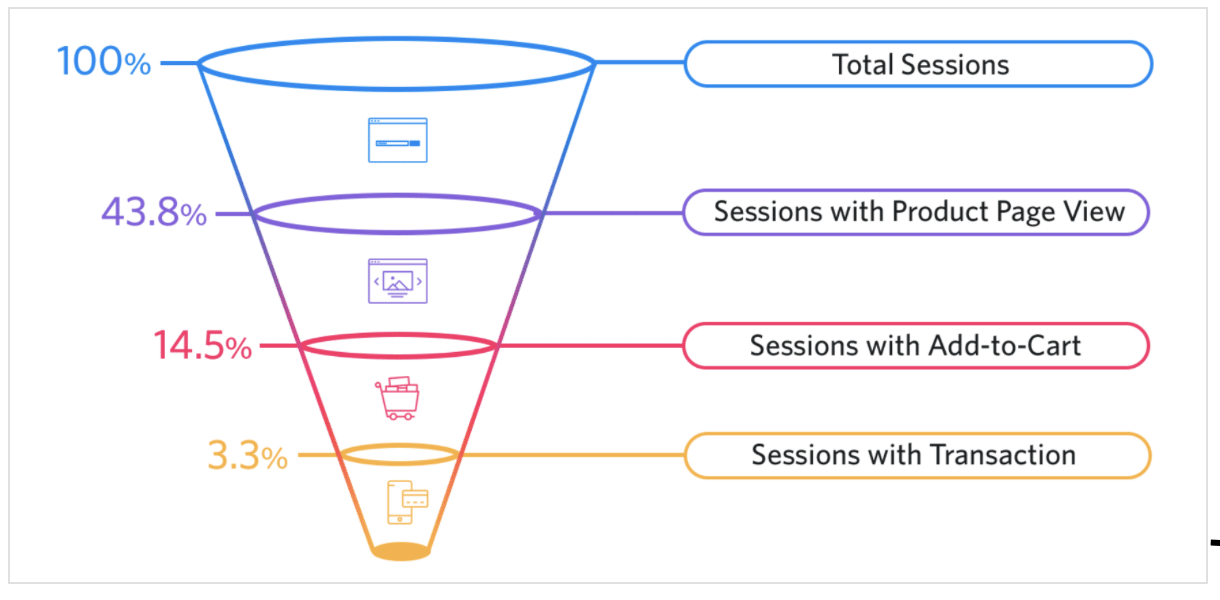
Don’t start with a list of ideas. Start with your sales funnel: product view, add to cart, checkout started, order placed. Google Analytics (or any analytics tool with ecommerce reports) shows the step where most shoppers leave. Fix the largest drop first. Set up your reporting before you change anything, so you know your starting numbers and can tell whether a change helped. Testing reliably is harder than it looks: many stores hire a specialist, and tools such as Optimizely and Hotjar can help you run basic tests and watch how visitors behave.
Improve the pages that carry the most weight
- Home page: clear navigation and search so shoppers reach products quickly.
- Product pages: plain descriptions, good images, and reviews, so buyers know what they’re getting.
- Landing pages: one goal per page, with the important information up front.
- Checkout: the last step before revenue, and the most common place to lose a customer. Remove unneeded fields, offer express payment, and show shipping and totals clearly. Read why the default WooCommerce checkout shouldn’t be your default.
- Shipping: shoppers expect free or clearly priced shipping. If you can’t offer it on everything, a threshold such as free shipping on orders over a set amount can also raise order value. See WooCommerce free shipping.
- About and policy pages: shoppers check who they are buying from, especially on a first order.
Fix the checkout first
Improvements elsewhere are wasted if the checkout loses the sale. CheckoutWC replaces the WooCommerce checkout with a conversion-focused template and adds the pieces a CRO program usually asks for: express payment buttons, order bumps to raise order value, a side cart, trust badges, and abandoned cart recovery emails. Order bumps also come with A/B testing, so you can test an offer instead of guessing. See our 8 checkout optimization tips for a checklist.
Recover abandoned carts
A shopper who added a product and left has already shown interest. A short sequence of recovery emails is often the lowest-effort CRO win. See WooCommerce cart abandonment for how to set one up.
Look beyond the website
Part of the customer journey happens off your site: the confirmation email, a support reply, a delivery update. If repeat business is your goal, review those moments too, and consider email automations for follow-up.
Should you hire a WooCommerce CRO agency?
A CRO agency can help when you have enough traffic to run meaningful tests and not enough time to run them. Before hiring, check three things:
- Traffic: tests need volume. A store with a few hundred orders a month can usually make faster progress by fixing obvious problems (checkout friction, slow pages, unclear shipping costs) than by running experiments.
- Process: ask how they choose what to test, how long tests run, and how they report results.
- Platform knowledge: a WooCommerce specialist knows your checkout, plugins, and hosting limits.
You can do the first round yourself. Measure the funnel, fix the checkout, then bring in help for ongoing testing.
WooCommerce tools for CRO
- Analytics: WooCommerce Google Analytics or another ecommerce-aware analytics tool, to see the funnel.
- Checkout: CheckoutWC, for the checkout, side cart, order bumps, and cart recovery.
- Reviews: a product review plugin, such as Customer Reviews for WooCommerce, to add social proof.
- Search: a product search extension if shoppers struggle to find items.
Start with the checkout
CheckoutWC is one plan with every feature, from $249 a year for one site. See pricing and fix your biggest leak first.

The simplicity of Shopify with the power of WooCommerce. Replace your WooCommerce checkout page with CheckoutWC to boost sales and reduce cart abandonment.