Do Trust Badges increase sales? A WooCommerce Checkout guide
Table of Contents
- The short answer
- What your customers worry about at checkout
- What the research shows
- Survey data vs. real purchases
- The bigger picture: cart abandonment
- When badges tend to help most
- When badges tend to help least
- What usually outperforms generic security seals
- Badge types ranked for WooCommerce checkout
- 1. Policy and guarantee badges (start here)
- 2. Payment and security reassurance
- 3. Third-party trust seals (use selectively)
- 4. Social proof at checkout (use carefully)
- How many badges?
- Placement matters more than badge count
- Should your store add trust badges? A 5-question checklist
- How to test trust badges without fooling yourself
- What to fix before - or instead of - trust badges
- Start with checkout UX (CheckoutWC Lite - free)
- Add trust badges when the checklist says yes
- The takeaway
- Next steps
- Sources
You have probably heard the pitch: add a few trust badges to your checkout and watch conversions climb.
It sounds simple. It is also incomplete.
Trust badges can increase sales on your WooCommerce store. The lift is usually smaller than the marketing suggests, highly dependent on your traffic and brand, and easy to get wrong. For some stores, the wrong badges in the wrong place do nothing. For others, they make checkout feel cluttered – which is the opposite of trustworthy.
This guide gives you a straight answer: when trust badges are worth adding to your checkout, when they are not, and what to fix first if you want more completed orders.
The short answer
Yes – trust badges can increase checkout conversions, but usually by a modest amount and only in the right context.
Rigorous A/B tests on live checkouts tend to show single-digit lifts for established brands – often roughly 1–3% for generic security seals placed near the payment step, with many tests showing results that are not statistically significant at all 9. Aggregated e-commerce tests from 2024–2025 report similar ranges: SSL-style badges around +1.0–2.5%, money-back guarantees around +1.5–3.5%, and vague custom badges performing worst 8.
Unknown brands, first-time visitors, and high-consideration purchases – expensive items, health products, niche categories – tend to see larger gains.
A field experiment analysis of more than 250,000 online transactions across 493 retailers (Ozpolat & Jank, Decision Support Systems, 2015 – still widely cited in later trust-seal research) 7 found that third-party trust seals are more effective for smaller retailers and new shoppers, partially substituting for brand familiarity and purchase history. The same study found that more than two seals can reduce purchase completion rates.
That does not mean every store should add badges tomorrow. It means badges work best as a targeted reassurance tool, not a universal conversion hack.
What your customers worry about at checkout
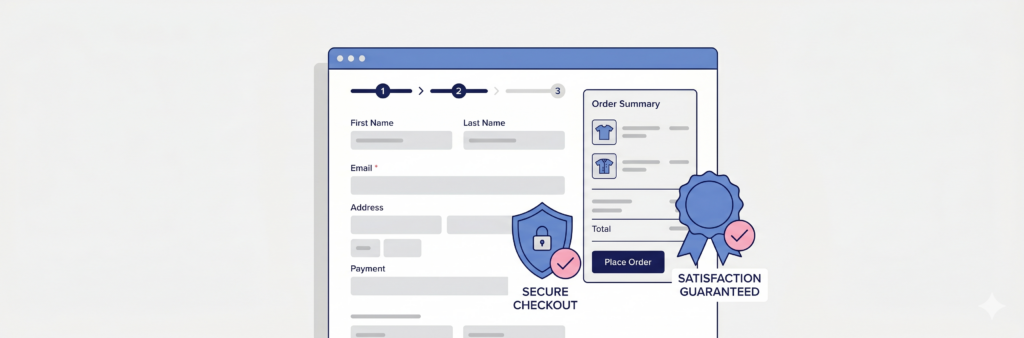
Trust badges only help if they address a real fear. When your customers reach checkout, they are usually weighing three separate anxieties:
- Payment security – “Will my card details be stolen?”
- Product confidence – “Will I actually get what I ordered?”
- Recourse if something goes wrong – “Can I return this? Is there a guarantee?”
A Norton or McAfee seal speaks to the first fear. A money-back guarantee speaks to the third. Payment method logos (Visa, Mastercard, PayPal) signal familiarity and legitimacy.
The problem: many stores load up on security seals while checkout still has confusing fields, slow loading, no express payment options, and a buried return policy. Badges cannot fix a leaky checkout. They only reduce hesitation at the final step – and only when the badge matches the hesitation.
Checkout experience matters more than badge count. A modern checkout for WooCommerce – guided steps, clear totals, mobile-friendly layout – removes friction for every visitor. Trust badges reassure the customers who still need one last nudge at the payment step.
What the research shows
Survey data vs. real purchases
Trust and security concerns are a documented driver of checkout abandonment. In Baymard Institute’s recurring US checkout survey – repeated annually and most recently reflected in 2025 data 5 – 19% of shoppers said they abandoned a purchase because they did not trust the site with their credit card information.
That is a meaningful slice of lost revenue, but it is not the whole story. Baymard’s usability testing 4 consistently finds that users judge security by visual cues – borders, background treatment, and badges around payment fields – rather than technical knowledge of encryption. Their research on perceived checkout security 3 shows users often treat only part of a page as “secure,” even when the entire page is HTTPS.
When Baymard asked thousands of users which trust badge gave them the best sense of security, roughly half selected “don’t know or no preference” – a reminder that many shoppers do not actively look for seals at all 6. Among those who did choose, familiar brands (PayPal, Norton, Verisign) won on recognition, not technical meaning.
Surveys show trust matters. Badge preference surveys, though, tend to overstate how much formal seals change purchase behavior compared to live A/B tests.
The bigger picture: cart abandonment
Trust badges sit inside a much larger problem. Baymard’s cart abandonment research 1 puts the average ecommerce cart abandonment rate at roughly 70% in 2025–2026. Security concerns are one solvable slice; shipping costs, forced account creation, and checkout complexity account for larger shares 2.
Improving the overall checkout experience on your store typically moves more revenue than adding badges alone.
When badges tend to help most
- New or unknown brands with cold traffic from ads, influencers, or marketplaces
- First-time buyers who have no prior experience with your store 7
- Higher-priced products where the financial risk feels greater
- Categories with trust issues – supplements, cosmetics, electronics from unfamiliar sellers
- International shoppers unfamiliar with your country’s consumer protections
When badges tend to help least
- Established brands with repeat customers who already trust you
- Stores with professional design, clear policies, and fast checkout – the marginal gain shrinks
- Mobile shoppers if badges are tiny, cluttered, or push critical content below the fold
What usually outperforms generic security seals
Across conversion studies and aggregated A/B results from 2024–2026, specific guarantees tend to beat vague security badges 8:
| Badge type | Typical impact* | Notes |
|---|---|---|
| Money-back / returns guarantee | Highest | “30-day no-questions returns” beats “100% satisfaction” |
| Free returns / free shipping | High | Especially apparel and footwear |
| Payment method icons | Moderate | Familiar logos near the Pay button |
| “Secure checkout” / SSL indicator | Low–moderate | Helpful for new stores; diminishing returns for known brands |
| Third-party security seals (Norton, McAfee) | Low–moderate | Older demographics respond more; many shoppers ignore them |
| Fake or unrecognizable custom badges | Can hurt | “100% Safe” graphics with no backing erode trust |
*Illustrative ranges from aggregated industry A/B tests (2024–2026) 8. Results vary by store, traffic source, and test design. Always test on your own site.
Your customers care more about what happens if it goes wrong than about abstract cryptographic security.
Badge types ranked for WooCommerce checkout
If you are deciding what to show at checkout, prioritize badges that answer your customers’ biggest hesitation.
1. Policy and guarantee badges (start here)
Short, specific promises work best:
- “30-Day Money-Back Guarantee”
- “Free Returns on All Orders”
- “Hassle-Free Refunds”
Pair each with a one-line description if space allows. Specificity matters. “Satisfaction guaranteed” is weaker than “Return within 30 days for a full refund.”
2. Payment and security reassurance
Payment logos (Visa, Mastercard, Amex, PayPal, Apple Pay) tell shoppers you accept familiar methods. A “Secure checkout” label with a lock icon covers SSL without needing an expensive third-party seal. Baymard recommends visually encapsulating payment fields 3 – background color, borders, and badges together – rather than scattering seals across the page.
3. Third-party trust seals (use selectively)
Seals from recognized security or accreditation providers can help – especially for newer stores – but they often require annual fees ($500+ in some cases) and are not a substitute for a checkout your customers already trust. Ozpolat & Jank (2015) 7 found diminishing returns beyond two seals. Test before committing long term.
4. Social proof at checkout (use carefully)
Star ratings, review counts, or “10,000+ happy customers” can work – but only if the numbers are real and verifiable. Inflated claims backfire quickly.
How many badges?
Two to four is the practical maximum at checkout – consistent with the academic finding 7 that more than two third-party seals can hurt completion rates. More than four creates visual noise and can slow mobile shoppers down.
Placement matters more than badge count
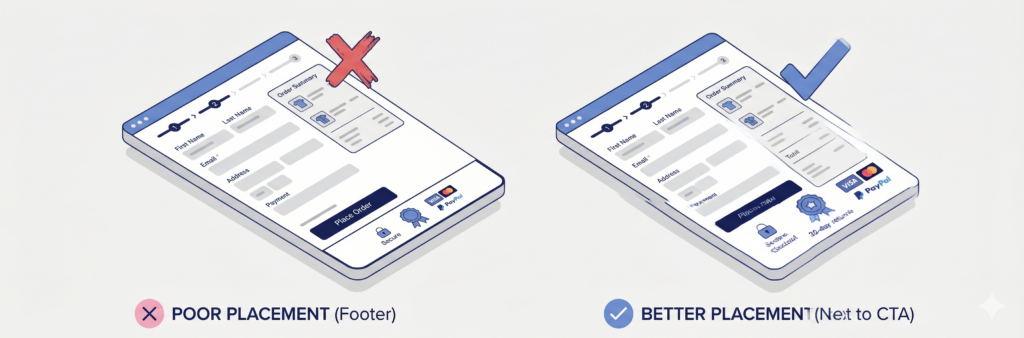
A guarantee badge buried in your footer does almost nothing. A single returns badge next to your Place order button can.
Ecommerce consultants who have run checkout tests 6 consistently report that duplicating a trust mark next to the Place order button – rather than leaving it only at the page bottom – reduces abandonment. Baymard’s payment-form research 10 reaches the same conclusion: security affordances belong adjacent to card fields, not in the site footer.
Best practices for your WooCommerce checkout:
- Place badges adjacent to the payment section or Place order button – where last-minute hesitation peaks
- Keep badges visible on mobile without scrolling past the CTA
- Use consistent icon style (line icons, same color palette)
- Use short labels – one to three words plus an optional short description
- Group related badges – payment icons together, policy badges together
Should your store add trust badges? A 5-question checklist
Answer honestly. Score one point for each “yes.”
- Does most of your traffic come from people who have never bought from you before? (paid ads, social, affiliates, marketplace referrals)
- Is your average order value above $75? (higher stakes = more hesitation)
- Is your return/refund policy hard to find or vague on checkout?
- Would you describe your brand as unknown in your niche? (not a household name)
- Is your checkout abandonment rate above 70%? (Baymard’s 2025–2026 benchmark 1 puts the industry average at roughly 70%)
Scoring:
- 4–5 yes: Trust badges are likely worth testing. Start with a guarantee and payment icons near Place order.
- 2–3 yes: Test one or two targeted badges, but prioritize checkout UX improvements first.
- 0–1 yes: Badges may add little. Focus on speed, clarity, and express payments before investing in seals.
This is a starting point, not a guarantee. The only definitive answer for your store is a proper A/B test.
How to test trust badges without fooling yourself
Before you test badges, make sure the basics are solid:
- Your site has a valid SSL certificate (HTTPS everywhere)
- Checkout loads in under three seconds on mobile 11
- Required fields are minimal and clearly labeled
- Return and shipping policies are easy to find
Then test badges properly:
- Change one thing at a time – badge type, placement, or copy, not all three
- Run the test long enough – at least two weeks or until you hit statistical significance (tools like VWO or Convert work well)
- Measure the right metrics:
- Checkout conversion rate (completed orders / checkout sessions)
- Cart abandonment rate
- Average order value (badges can increase confidence on larger purchases)
- Segment if you can – new vs. returning visitors often respond differently
If badges show no lift after a clean test, remove them. Clutter hurts more than empty space.
What to fix before – or instead of – trust badges
Trust badges are a finishing touch. They work best on a checkout for WooCommerce that already feels professional – fast, clear, and built for mobile.
Start with checkout UX (CheckoutWC Lite – free)
WooCommerce’s default checkout leaves a lot of revenue on the table. CheckoutWC Lite extends WooCommerce with a conversion-focused checkout flow – free to install from WordPress.org.
What it gives your store:
- Guide customers step-by-step through checkout so form fatigue drops and more orders complete
- Offer express payments – Apple Pay, Google Pay, and PayPal with supported gateways – so mobile buyers finish faster
- Catch errors before submit with smart field validation and ZIP-to-city/state autocomplete
- Adapt to what’s in the cart – digital orders, subscriptions, and shipped products show only the fields customers need
These changes address abandonment for every shopper – not only the ones who notice badges. Baymard’s checkout research 2 consistently ranks checkout complexity and mobile UX among the top abandonment drivers. Fixing those on your store delivers a larger gain than adding seals to a checkout customers already struggle with.
Install CheckoutWC Lite free – most stores are live in minutes.
Add trust badges when the checklist says yes
When your checkout flow is solid and you want reassurance at the payment step, CheckoutWC paid plans add built-in trust badges to WooCommerce – no separate extension required.
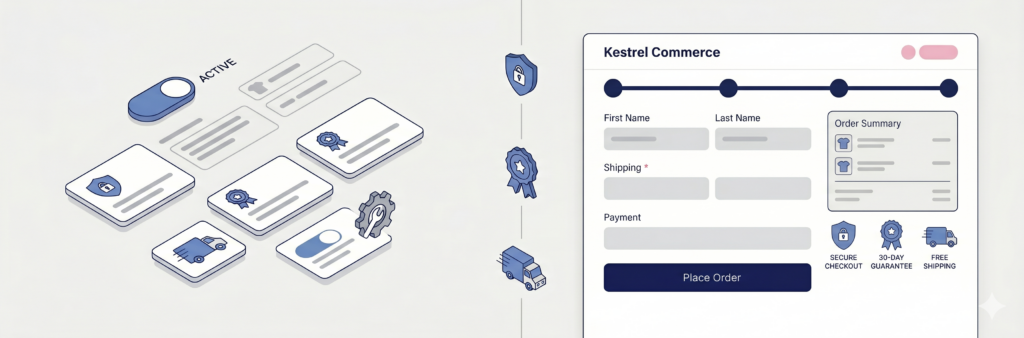
In CheckoutWC → Trust Badges, you can:
- Display guarantee and security badges next to your order summary with custom icons and short labels
- Control placement and order so badges sit where hesitation peaks
- Highlight your store’s policies – returns, secure checkout, shipping promises, or unique selling points
- Combine with side cart and order bumps to increase average order value alongside trust
Your Lite settings carry over when you upgrade. Checkout keeps running without interruption.
See our guide on how to add trust badges to WooCommerce.
The takeaway
Trust badges on WooCommerce checkout can increase sales – but they are not a substitute for a store your customers already trust, or a checkout that does not fight them.
They work best when:
- You have cold or first-time traffic
- Your badges address a specific fear (returns, security, payment familiarity)
- They sit next to the Place order button, not scattered across the site
- You use two to four clear, credible signals – not a wall of seals
They fail when:
- Checkout is already slow, confusing, or dated
- Badges are generic, fake-looking, or unrecognizable
- You add them without testing and never measure the result
Fix checkout first. Add badges when the data – or the checklist above – says your shoppers need that final push.
Next steps
- Not sure where to start? Install CheckoutWC Lite and give your store a modern checkout – free.
- Ready to test trust badges? Get CheckoutWC.
- Want the bigger picture on abandonment? Read our guide to WooCommerce cart abandonment.
Sources
- Baymard Institute – Cart abandonment rate statistics (2025–2026)
- Baymard Institute – Reasons for cart abandonment
- Baymard Institute – How users perceive checkout security
- Baymard Institute – Credit card form UX and abandonment data
- Statista – US checkout abandonment reasons, 2025 (citing Baymard)
- Econsultancy – Which ecommerce security logos do users trust? (Baymard trust seal study summary)
- Ozpolat & Jank – Getting the Most out of Third Party Trust Seals (Decision Support Systems, 2015)
- CartyLabs – Shopify checkout trust badges analysis (2026 aggregated A/B ranges)
- Product Philosophy – Trust signals field-test compendium (2026)
- Baymard Institute – How users perceive security during the checkout flow
- Google – Core Web Vitals guidance
CheckoutWC extends WooCommerce with a conversion-optimized checkout – trusted by thousands of stores. Try Lite free, upgrade when you are ready.

The simplicity of Shopify with the power of WooCommerce. Replace your WooCommerce checkout page with CheckoutWC to boost sales and reduce cart abandonment.