WooCommerce one page checkout: how to set it up and when it fits

Table of Contents
- What one page checkout changes
- Turn on one page checkout in CheckoutWC
- One page checkout vs one click checkout
- Decide whether one page checkout fits your store
- Shorten the checkout further
- Skip the cart and shipping steps
- Offer express checkout
- Add a side cart
- Compare other one page checkout plugins for WooCommerce
- WooCommerce One Page Checkout
- WooCommerce Fast Cart
- FunnelKit
- Cashier
- Try one page checkout on your store
One page checkout puts a customer’s details, shipping, and payment on a single screen, so shoppers fill in one page and click one button to pay. In CheckoutWC it’s one setting: open CheckoutWC » Pages, go to the Checkout tab, and under Steps turn on Enable One Page Checkout.
A search for “WooCommerce one page checkout” turns up two different things. One is a checkout layout where every step shows on one page. The other is a plugin that puts product selection and checkout on the same page, so a shopper can buy from a landing page without going anywhere else, such as the WooCommerce One Page Checkout extension. We make CheckoutWC, so we show that setup first and describe the alternatives from their own pages.
What one page checkout changes
With one page checkout on, CheckoutWC keeps the same fields and payment methods but removes the steps between them:
- The step breadcrumbs and the buttons that move shoppers between steps are gone.
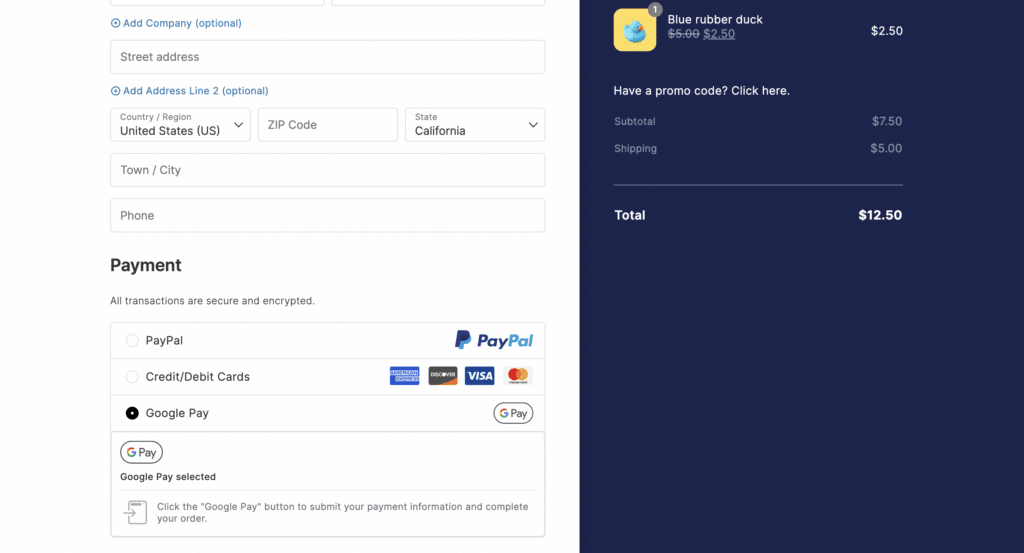
- The information, shipping, and payment sections all show on the page at once.
- The payment section ends with the place order button, so there’s one button at the bottom of the page.
- Express checkout buttons stay at the top of the page, for the gateways CheckoutWC supports, such as Apple Pay, Google Pay, PayPal, and Amazon Pay.
- On phones, the mobile cart summary moves into the payment section.

CheckoutWC has five templates (Midas, Copify, Futurist, Glass, and Groove), and you can compare them on the demo page.
Turn on one page checkout in CheckoutWC
Install and activate CheckoutWC first (see the installation guide), then:
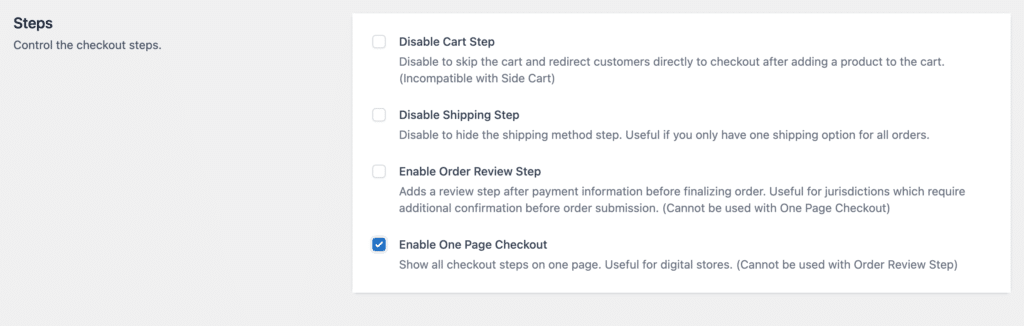
- Go to CheckoutWC » Pages in WordPress and open the Checkout tab.
- Under Steps, turn on Enable One Page Checkout.
- Click Save Changes.
- Add a product to your cart and open the checkout to see the single page.
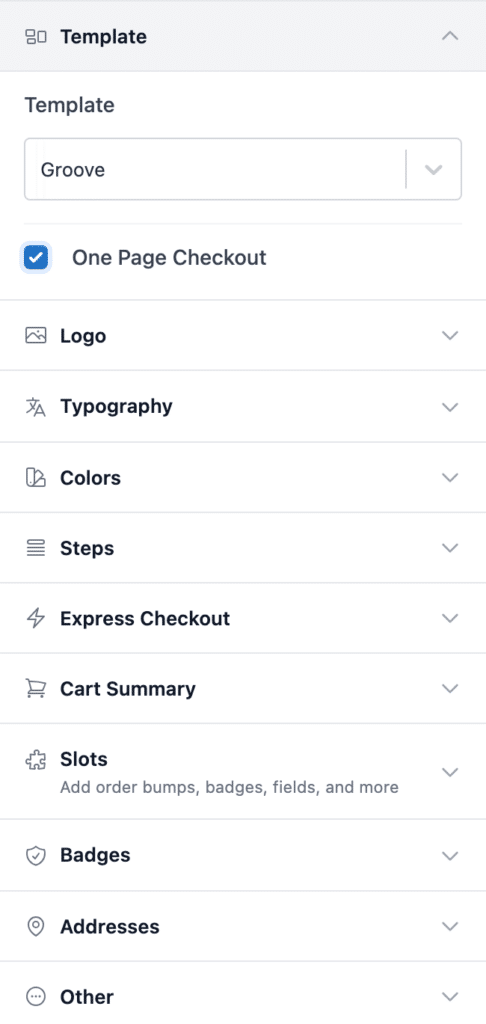
If you work in the Checkout Editor, the same setting is One Page Checkout in the Template section. One page checkout and Enable Order Review Step can’t be used together, so turn off the order review step if it is on. The full walkthrough is in the one page checkout documentation.
One page checkout vs one click checkout
They’re different things. One page checkout is a layout: everything on one screen, but the shopper still enters details and pays. One click checkout skips the form entirely for a customer whose details and payment method are already saved. In CheckoutWC, wallet buttons such as Apple Pay and Google Pay (express checkout) give returning shoppers a near one click path, and post-purchase offers on the thank you page can be accepted with one click using the payment method the customer just used.
Decide whether one page checkout fits your store
Most carts are abandoned before purchase: Baymard Institute puts the average documented rate at about 70 percent, and lists a too long or complicated checkout among the reasons shoppers give.
One page checkout cuts clicks, but Baymard’s research points to another lever: the number of form fields matters more than the number of steps. A one page layout with a long form can still feel long, so cutting fields you don’t need is worth doing whichever layout you choose. Our guide to removing checkout fields shows how.
- One page suits digital products and services, where there is no shipping step, and stores where customers buy one or two items and want the shortest path to paying.
- Multi-step may suit better a store with several shipping options or longer forms, where separate steps keep each decision on its own screen.
Neither layout wins everywhere, so test yours. Turn one page checkout on, compare your checkout conversion rate over a few weeks against the weeks before, and turn it off again if it doesn’t help.
Shorten the checkout further
One page checkout works well beside three other CheckoutWC settings that remove steps or taps. Our guide to a slow WooCommerce checkout covers the performance side.
Skip the cart and shipping steps
In the same Steps section of CheckoutWC » Pages, Disable Cart Step sends customers straight to checkout after they add a product to the cart, and Disable Shipping Step hides the shipping method step, which suits a store with a single shipping option. The cart step setting can’t be used with the side cart. See our guide to skipping the cart in WooCommerce.

Offer express checkout
Express checkout puts wallet buttons at the top of the checkout so shoppers can pay without filling in the form (our article on WooCommerce express checkout covers the options). The buttons come from your payment gateway plugins, and CheckoutWC places and styles them. The Express Checkout page in CheckoutWC lists the gateways it detects and how well each is supported; see supported express payment gateways.
Add a side cart
The side cart is a slide-out cart that replaces the separate cart page, with coupons, totals, suggested products, order bumps, and a rewards bar that can show progress toward free shipping. You’ll find it under CheckoutWC » Side Cart; see the side cart guide.
Compare other one page checkout plugins for WooCommerce
Check each page below for current pricing and renewal terms before you buy.
WooCommerce One Page Checkout
WooCommerce One Page Checkout is a paid extension that places product selection and the checkout form on the same page. It suits landing pages and promotions, because a shopper can pay without leaving the page. You add its shortcode to any page or post and write your own content above it.
WooCommerce Fast Cart
WooCommerce Fast Cart by Barn2 opens checkout in a popup, so customers can complete their order directly in the popup, and can skip the cart page entirely. It also adds a floating cart icon that opens the cart from any page.
FunnelKit
FunnelKit offers both one-page and multistep checkout for WooCommerce, lets you create and test multiple checkout layouts with built-in testing, and shows inline validation messages.
Cashier
Cashier is a toolkit that includes its own one page checkout, a checkout field editor, a buy now button for returning customers, minimum and maximum quantities per product, and targeted cart notices such as a free shipping reminder.
Try one page checkout on your store
If your orders are simple, one page checkout takes a minute to turn on and a few weeks to judge. Check the result on a phone and a computer before you send traffic to it, and pair it with fewer fields and express checkout. Our guide to WooCommerce cart abandonment covers what to do for the shoppers who still leave.
One page checkout is included with every CheckoutWC plan, alongside the side cart, express checkout, and order bumps. See CheckoutWC pricing.

The simplicity of Shopify with the power of WooCommerce. Replace your WooCommerce checkout page with CheckoutWC to boost sales and reduce cart abandonment.