The WooCommerce thank you page is the last thing customers see after completing a purchase. It’s also one of the most overlooked opportunities to build trust, recover revenue, and ensure accurate conversion tracking.
CheckoutWC replaces the default WooCommerce order confirmation with a modern thank you page that matches your checkout experience, shows real-time order status, and supports post-purchase upsells.
Note: The Thank You Page feature is available on Plus, Pro, and Agency plans.
What’s wrong with the default WooCommerce thank you page
The default WooCommerce “Order received” page is functional but bare. It displays order details in a basic table format with no visual hierarchy, no order status tracking, and no way to add post-purchase offers.
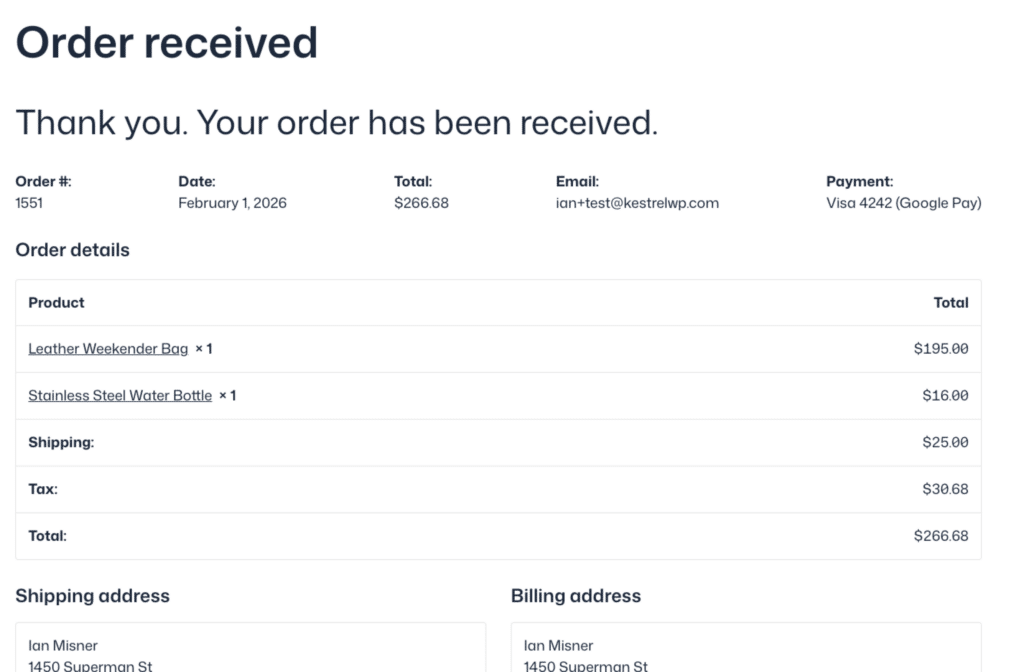
Unmodified and default WooCommerce thank you page (on Ollie theme)
Common issues with the default page:
- Doesn’t match your checkout branding or design
- No visual confirmation that the order is being processed
- Customers have no idea what happens next
- Missed opportunity for post-purchase upsells
- Basic layout that feels like an afterthought
What CheckoutWC’s thank you page adds
CheckoutWC transforms the order confirmation into a branded, conversion-optimized experience.
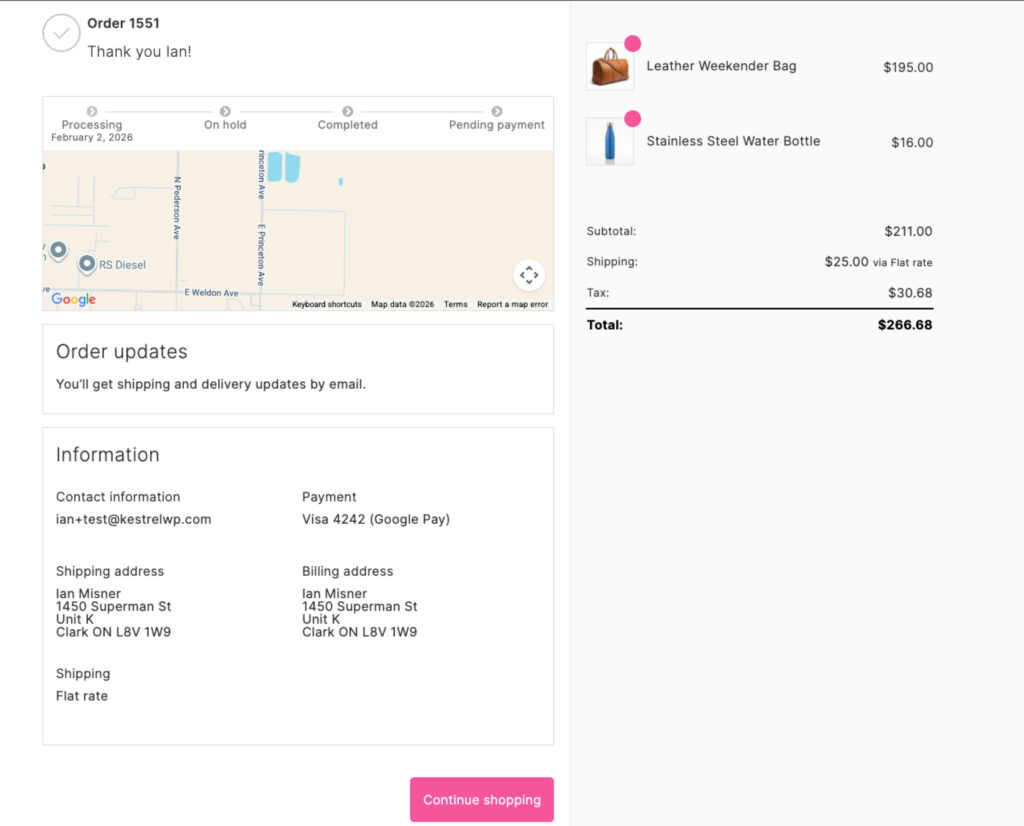
The exact same order with CheckoutWC active
Visual order status tracker
Think of it like the Domino’s pizza tracker for your orders. Customers see exactly where their order is in your fulfillment process with a visual progress bar showing statuses like Processing → Shipped → Completed.
You control which statuses appear. For digital products, you might show Processing → Completed. For physical products with custom workflows, you can add statuses like “Quality Check” or “Packed” using WooCommerce Order Status Manager.
This reduces “where’s my order?” support requests and builds confidence that the purchase went through successfully.
Consistent checkout experience
The thank you page uses the same template as your CheckoutWC checkout, so the design feels cohesive from cart to confirmation. This also applies when customers view past orders from their My Account page.
Map embed
Optionally display a Google Map showing the shipping address. This adds a visual confirmation that the order is going to the right place and reinforces trust immediately after purchase.
Fast page load
The thank you page is lightweight and renders quickly, which matters for conversion tracking. Slow thank you pages can cause tracking pixels to fail before they fire, leading to inaccurate attribution data.
Post-purchase upsells on the thank you page
The moment after a customer completes a purchase is the highest-intent moment in the entire shopping journey. They’ve already committed, their payment info is on file, and they’re feeling good about buying from you.
CheckoutWC’s post-purchase order bumps display a one-click upsell offer immediately after checkout. Customers can add the offer to their existing order with a single click, with no need to re-enter payment details.
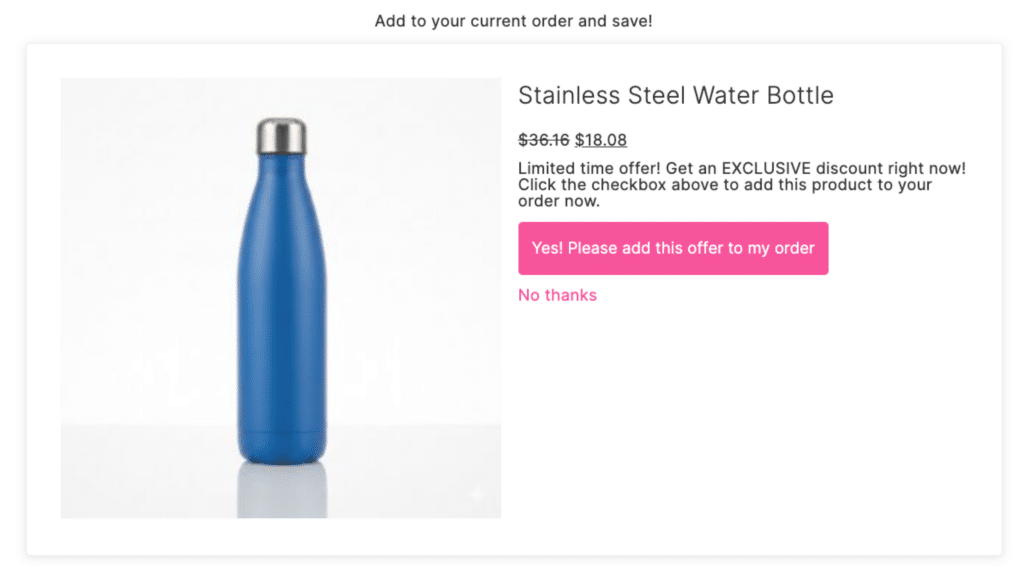
A post purchase upsell shown on the Thank you page with CheckoutWC
This is one of the most effective ways to increase average order value without adding friction to the checkout itself.
Changing the thank you page URL
By default, the WooCommerce thank you page URL is /checkout/order-received/. You can change this to match your branding or language.
For example, to change the URL to /checkout/merci/ for a French store:
- Go to WooCommerce > Settings > Advanced
- Find the Checkout endpoints section
- Change Order received from
order-receivedto your preferred slug (e.g.,merci) - Save changes
CheckoutWC respects WooCommerce’s endpoint settings, so any changes you make there apply automatically to the CheckoutWC thank you page.
Conversion tracking on the thank you page
The thank you page is where most conversion tracking pixels fire. When a customer lands on the order confirmation, scripts for Google Analytics, Facebook/Meta, Google Ads, and other platforms record the purchase event.
Common tracking challenges:
- Payment gateway redirects: Customers who pay via PayPal, Klarna, or other off-site gateways may not return to the thank you page, causing missed conversions.
- Ad blockers: Around 30% of users run ad blockers that can prevent tracking scripts from firing.
- Slow page loads: If the thank you page takes too long, customers may close the tab before tracking fires.
- Duplicate events: Customers who refresh the thank you page can trigger duplicate purchase events.
CheckoutWC’s fast-loading thank you page helps with the speed issue, but for complete conversion tracking accuracy, we recommend pairing CheckoutWC with ConversionBridge.
ConversionBridge uses server-side tracking to capture purchase events regardless of ad blockers, page refreshes, or payment gateway redirects. It fires when the order is confirmed in WooCommerce, not when the thank you page loads in the browser.
Setup guide
Ready to enable the CheckoutWC thank you page? See our step-by-step Thank You Page setup guide for configuration instructions.