CheckoutWC 11.3.1: Preview Any Cart in the Checkout Editor

11.3.1 is a maintenance release shaped by merchant feedback – a set of improvements that take the guesswork out of setting up your checkout, alongside a good round of fixes.
The theme running through it is visibility. Your Checkout Editor can now preview any cart you choose, so you can see how checkout renders for a digital-only order, a mixed one, or a cart holding the product an order bump waits for. Order bumps are editable in place, without leaving the editor. The editor speaks up when a bump will never reach customers, rather than leaving you to spot it in a revenue report. And Google address autocomplete gains support for Google’s new Places API, along with a button that tests your API key and tells you what it found.
All of it is waiting in your admin once you update.
Preview any cart in the Checkout Editor
The Checkout Editor header has a new Preview Cart control, sitting next to the device toggles. Open it and you choose the products the preview runs on – up to ten of them, searchable by name or SKU.
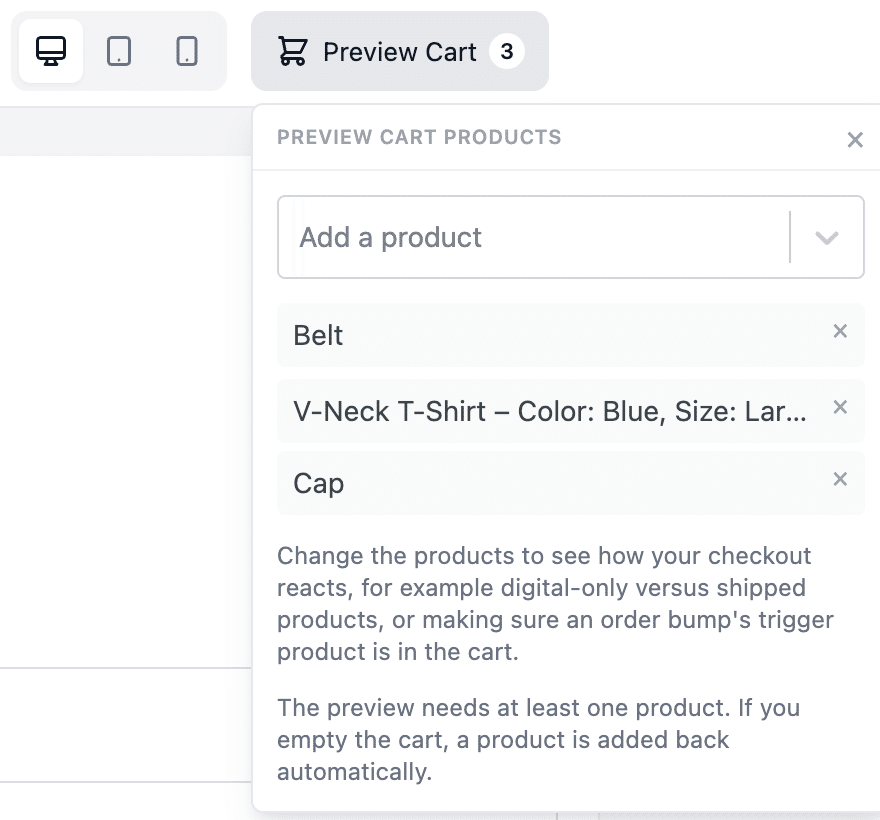
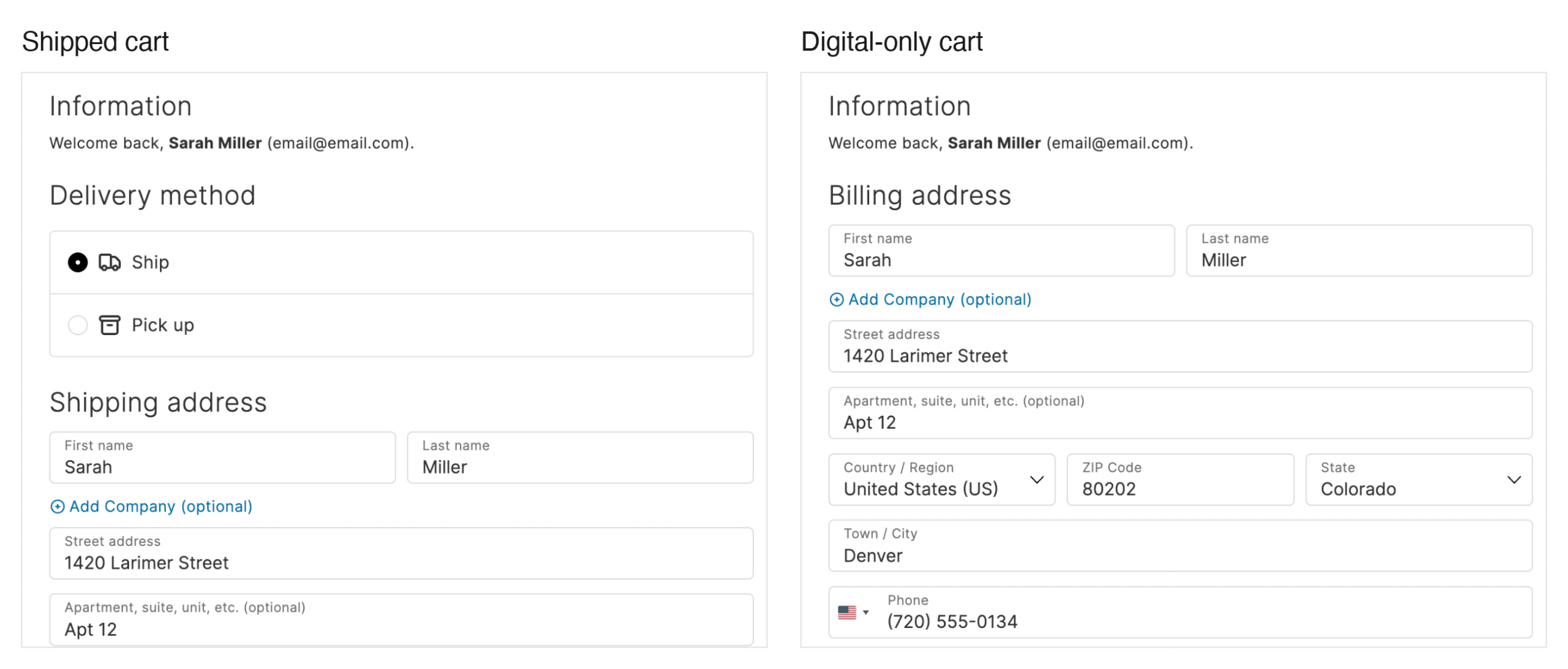
That matters because your checkout is not one page. A digital-only cart renders without a shipping address section and without shipping methods. A mixed cart renders both. An order bump with a display condition only appears once its trigger product is in the cart. Until now, seeing any of that meant adding products to your own cart, checking the editor, and remembering to clean up afterwards.
Now you swap the preview between a shipped product, a downloadable one, and a variation, and watch the checkout rebuild each time. Remove the shipped line and the shipping step disappears – and the Slots panel still lists the shipping-only slots, with a note that their absence on that kind of order is expected. Add the product an order bump waits for and the bump renders.
The preview also stopped borrowing your cart. It now runs on a cart of its own: every preview request swaps WooCommerce’s session keys out for a bucket of its own and swaps your values back when the request ends. Change a quantity, apply a coupon, pick a different shipping rate, or accept an order bump inside the preview, and your own cart is exactly as you left it. Previously the editor preview added items to your cart and left them there, so your own shopping showed up alongside the preview product.
A few details worth knowing:
- Your selection persists across editor reloads, and across logging out and back in
- The last line cannot be removed – the preview needs at least one product, so it never renders an empty checkout
- Variations appear in the search individually, labelled with their SKU; a variable parent does not, since it needs a variation chosen to be a real cart line
- A preview product that goes out of stock or moves to draft is dropped quietly on the next load rather than breaking the preview
Edit an order bump without leaving the editor
Click the pencil on a bump chip in the Slots panel, then Edit order bump, and the bump editor opens in a modal over the top of the Checkout Editor – no WordPress admin menu, no admin bar, no footer, no new browser tab.
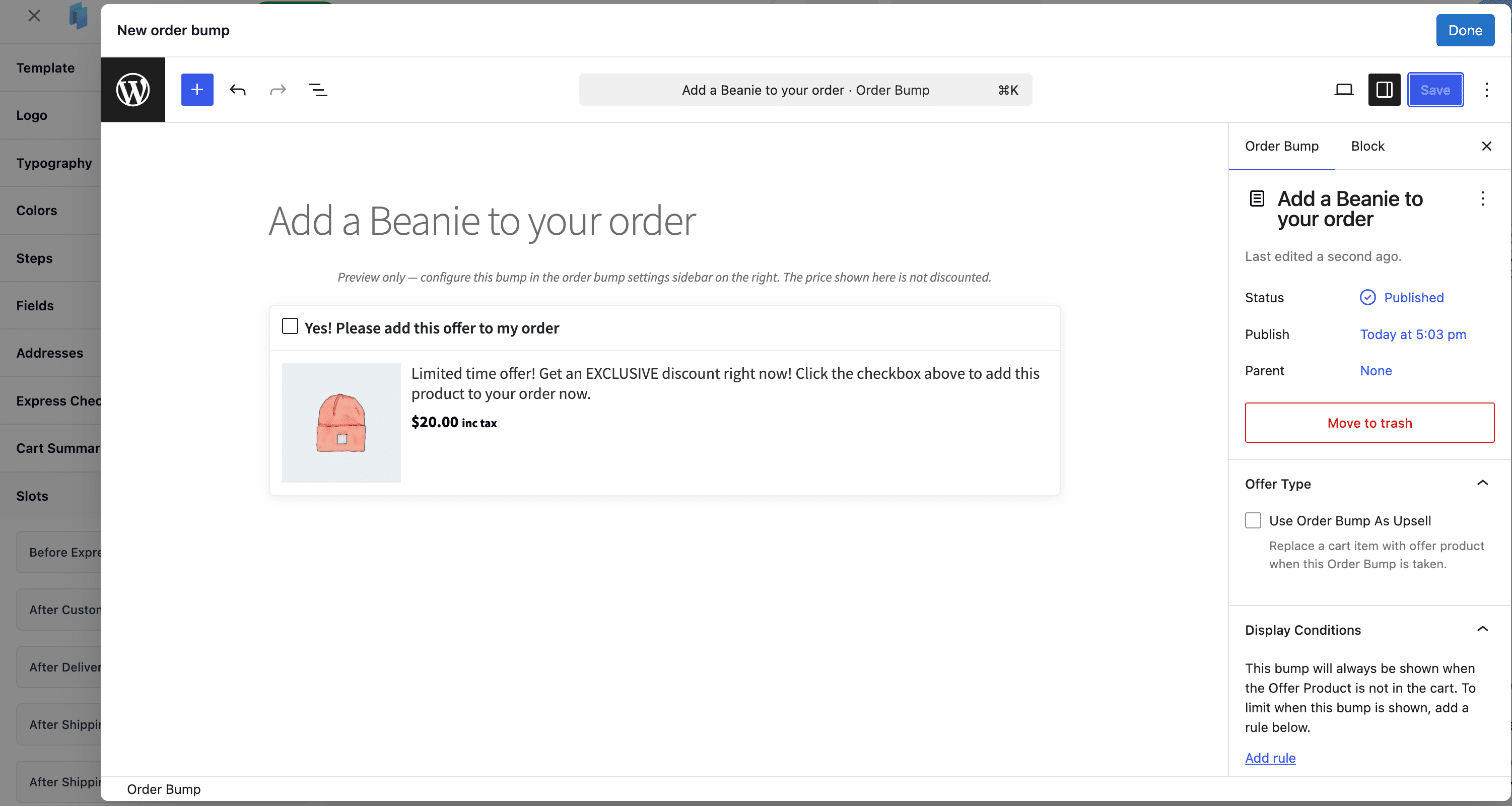
Change the title, add a display condition, or move the bump to a different slot. When you click Done, the chip label updates without a page reload, the preview reloads, and it scrolls to that bump’s slot and outlines it so you can see what you changed. Change the display location and the chip moves between slot rows, both slots’ item counts update, and the preview scrolls to its new home.
You can also create a bump for a specific slot. Open a slot’s + menu, choose + New order bump, and the new bump’s display location is already set to the slot you started from.
Two smaller behaviours that make it usable in practice: unsaved changes elsewhere in the editor survive a trip through the bump modal, so adding a heading to one slot and then editing a bump in another does not cost you the heading. And if you pick a display location that is not a checkout slot – Place Order Click, a side-cart-only position, or Post Purchase One-Click – the bump editor tells you the bump will no longer appear in the Checkout Editor and points you to the Order Bumps page to manage it instead. It never blocks the save. That is your call to make.
The editor tells you when a bump cannot reach customers
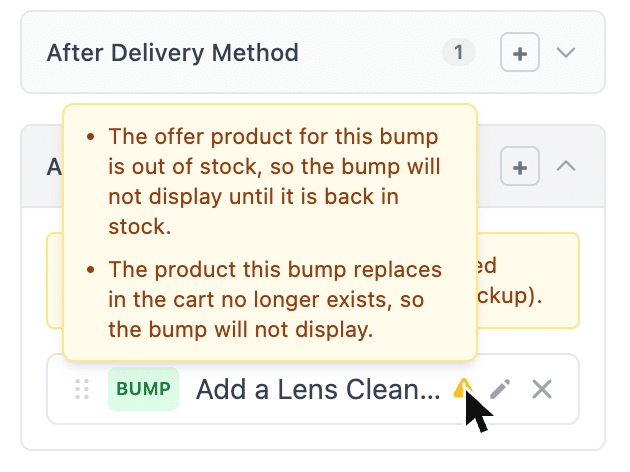
An order bump that never renders costs you nothing in errors and everything in revenue. The Checkout Editor now warns you about the ways that happens.
A bump is flagged when:
- Its offer product is unpublished, has no price, is out of stock, or no longer exists
- The product an upsell bump replaces in the cart is gone
- Its display location is a side cart position, but the side cart – or the side cart’s own order bumps setting – is switched off, with a link straight to side cart settings
- Its offer product is hidden from your shop catalog, so the bump is the only place customers will ever see that product
That last one is informational rather than a problem. Hiding a product from the catalog is a legitimate way to run an exclusive checkout offer, and the bump still renders. The warning is there so it is clear which of your products customers cannot find any other way. Upsell bumps also now note in the editor that they only appear once the product they replace is in the cart.
The product pickers behind those bumps were rebuilt at the same time. They now:
- Return up to 100 matches, ordered alphabetically, searchable by product name or SKU
- Put parent products above their own variations, so a variable product with 25 variations no longer buries its parent out of reach
- Name each variation by its attributes with the SKU in parentheses, instead of repeating the parent title for every sibling – and the Offer Product column on the Order Bumps list does the same, so you can tell at a glance whether a bump offers a whole variable product or one variation
- Return published products only by default, so a bump can no longer be pointed at a draft, pending, scheduled or private product, or at a disabled variation, that would never show to a customer
- Label the exceptions: catalog-hidden products read “Hidden”, search-only products read “Search only”
The published-only default is a behaviour change. If you deliberately offer a private product, there is a filter to widen it – see the developer note at the end.
Google address autocomplete: Places API (New) and a key you can test
Google made the Places API a legacy service on 1 March 2025. Its own guidance is blunt about what that means: “Legacy services are not available in new Cloud projects but remain fully supported for existing projects” 1.
So if your Google Cloud project was created after that date, you cannot enable the legacy Places API at all, and address autocomplete could not work no matter how correct your key was.
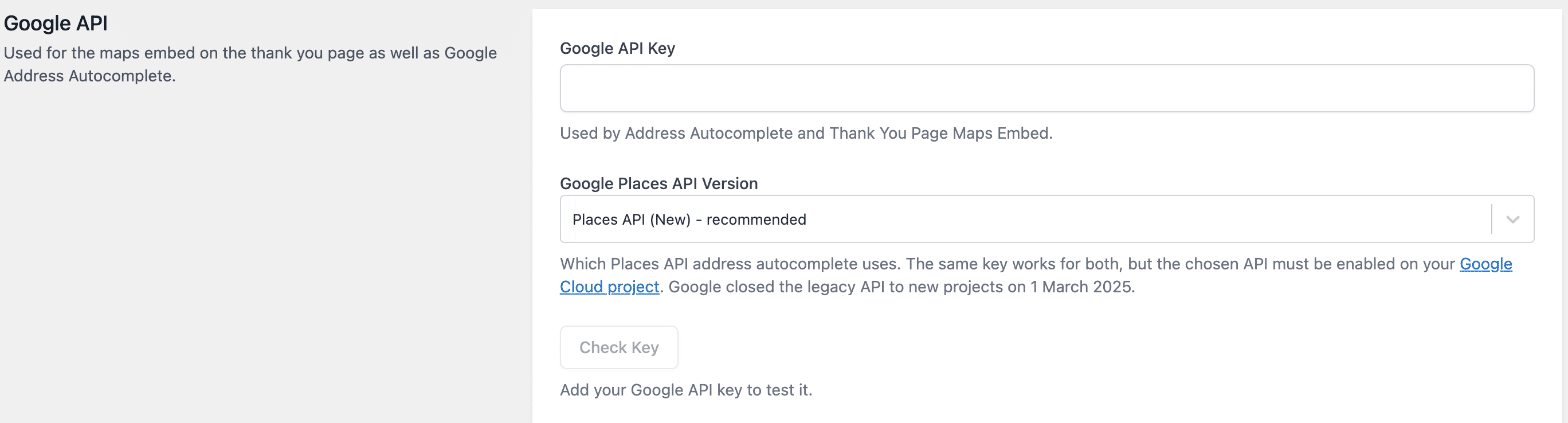
11.3.1 adds a Google Places API Version setting on the Integrations page, with two options: Places API (New) – recommended, and Places API (Legacy). New installs default to the new API. Existing stores stay on the legacy API until you switch. Nothing about a working checkout changed when you updated.
Both versions fill the same address fields the same way – street number and street name in the right order for the locale, city, county or state resolved to the matching option in the select, postcode, country. On Places API (New), predictions render in our own dropdown rather than Google’s, which means keyboard navigation works properly: arrow keys move the highlight, Enter selects, Escape closes.
The other half of this is a Check Key button on the same page. It tests your key from your browser and reports what it found:
- A row each for Places API (New), Places API (Legacy) and the Geocoding API, showing which ones answered
- A verdict that accounts for the version you selected – if your project supports the new API only, it tells you to switch the setting rather than reporting a broken key
- The difference between “this API is not enabled on your project, or not in your key’s allowed API list” and “Google refused this key for this site”, which is a website restriction on the key and a completely different fix
- Anything else switched off that would stop autocomplete running – autocomplete disabled, Separate Address Fields on, Fetchify autocomplete also on, the thank-you page map off – each with a link to the settings screen that controls it
- The raw response from Google, so you can paste it into a support conversation
If Google is unreachable at checkout, on either version, the address fields stay usable, typed input is kept, and the order can still be placed.
Also new
Abandoned Cart Recovery no longer competes with WooCommerce’s own. While CheckoutWC’s abandoned cart recovery is switched on, WooCommerce’s built-in recovery email stays quiet, so shoppers get one set of reminders instead of two.
Pickup locations have an Order field that sets the sequence they appear in at checkout, with a matching sortable Order column on the Pickup Locations list.
Fixes worth knowing about
- Stripe: checkout no longer fails with a critical error in two situations – when the WooCommerce Stripe Gateway is active but has switched itself off because it needs a newer version of WooCommerce, and when its express checkout button locations have never been set
- International phone field: landline numbers are accepted again. The field was validating against mobile number lengths only, which blocked checkout in countries where landline and mobile numbers differ in length, such as Japan
- A/B testing: a test restored from the trash comes back as a paused draft, so publishing it does not resume the test until you set it active; an order bump variant keeps the original bump’s position and margin within its slot while a test runs; and visiting the New A/B Test screen and leaving without saving no longer leaves an untitled test behind
- Local pickup: the Pickup Location column now shows on the orders list with high performance order storage enabled, not only on the legacy orders screen
- Shipping: switching quickly between two shipping methods no longer reverts the selection, or any delivery date calendar shown beneath it
Also fixed: WooPayments express checkout button rendering; the side cart free shipping progress bar keeping its styling under WP Rocket’s Remove Unused CSS; WPML and Polylang store policy links opening the connected translation of the page; a slow or blocked Fetchify library no longer holding up the rest of the checkout; and a PHP warning on shipping packages with no available rates. The full changelog has every entry.
For developers
cfw_admin_product_search_post_statuses controls which post statuses the order bump product pickers return. It defaults to publish only; return an array to widen it.
add_filter( 'cfw_admin_product_search_post_statuses', function ( $statuses ) {
	return [ 'publish', 'private' ];
} );
Products surfaced this way are labelled with their status in the picker results.
Updating
You can update to 11.3.1 via Plugins in WP Admin.
Further reading: order bumps, Checkout Slots, Google Address Autocomplete, local pickup, side cart and Abandoned Cart Recovery.
Sources
- Google Maps Platform – Legacy products and features – services in the Routes and Places areas became legacy on 1 March 2025; legacy services are unavailable in new Cloud projects and remain supported for existing ones, with at least 12 months’ notice before any decommission